WINAPI::shellExecute("iexplore.exe","yahoo.com");Monday, November 21, 2011
Executing application from Dynamics AX
Simply use :

System does not support setup 'continuous' of number sequence Error
System does not support setup 'continuous' of number sequence error :

This error will be thrown if whenever NumberSeq::newGetNum function is called without an encapsulating transaction. To fix this error simply put number sequence related function within a ttsbegin and a ttscommit;
Thursday, October 27, 2011
Connecting Atlas XL to Dynamics AX Server
To setup a new connection from Atlas XL to Dynamics AX server, you have to run Atlas Server Service Configuration.
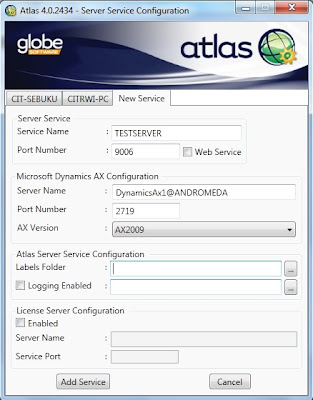

Screenshot of Atlas XL Server Service Configuration
To setup a new connection, you will need to configure a few things :
- Specify a name for the connection that you want to add in Service Name (TESTSERVER).
- Specify a port number for Atlas XL to use between Atlas XL client and server service. (By default it will specified 9006, note that if you change the port number in the server service, you will need to change them in the client service).
- Specify a Dynamics AX service name. Which for me is DynamicsAx1 (Dynamics instance name) located on Andromeda server.
- Specify a port number used by Dynamics AX service.
- Click on Add Service and you are ready to go.
Wednesday, October 26, 2011
Setup button in Form
Usually when right clicking while running a form, there is a Setup button in the context menu. But sometimes if there isn't. In that case, for that specified user, a permission must be set. 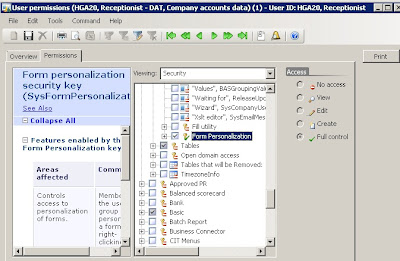
You can set the permission by doing :
- Make sure that you are opening Administration tab.
- Click on Users and select the specified user (For this case I selected "receptionist").
- Click on the Permission button.
- Click on the Permission tab in the User Permission window.
- Make sure that you are viewing Security, and go to Administration -> Miscellanous and look for Form Personalization value. Make sure that it is checked and if it is not you can give it a value by changing the Access Mode.
User Permission window
Monday, October 17, 2011
Creating Go to the Main Table Form References
There's a couple ways to implement Go to the Main Table Form references.
Here's the easiest way :
1. Create an Extended Data Type and relates it to the table you're referencing.
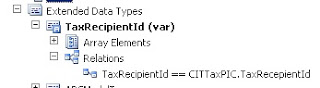
2. Create a form based on the main table (in my case it is CITTaxPIC table).
3. Create a MenuItem references to the created form (CITTaxPIC form).
4. Set FormRef in the main table to the created MenuItem (CITTaxPIC).
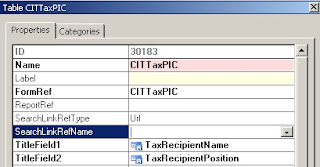
5. Add a new field using the EDT to the form data source's table you want to setup Go To Main Table Form references and you're ready to go.
Note that the displayed field are the EDT and the fields, set up in TitleField1 and TitleField2 in the Main Table.

2. Create a form based on the main table (in my case it is CITTaxPIC table).
3. Create a MenuItem references to the created form (CITTaxPIC form).
4. Set FormRef in the main table to the created MenuItem (CITTaxPIC).

5. Add a new field using the EDT to the form data source's table you want to setup Go To Main Table Form references and you're ready to go.
Note that the displayed field are the EDT and the fields, set up in TitleField1 and TitleField2 in the Main Table.
Thursday, October 13, 2011
Creating and Using Number Sequences
public server static NumberSequenceReference numRefCustomNumber()
{
    return NumberSeqReference::findReference(typeId2ExtendedTypeId(typeid(CustomId)));
}
Tuesday, October 11, 2011
Classes used while Posting Picking List, Packing Slip, Purchase Order, Invoice
Used for Posting Receipts List :
- Class
- Tables :
Used for Posting Packing Slip :
- Class
- Tables :
Used for Posting Purchase Order :
- Class
- Tables :
Used for Posting Invoice :
- Class
- Tables :
- Class
PurchFormLetter_ReceiptsList- Tables :
vendReceiptsListJour, vendReceiptsListTransUsed for Posting Packing Slip :
- Class
PurchFormLetter_PackingSlip- Tables :
vendPackingSlipJour, vendPackingSlipTransUsed for Posting Purchase Order :
- Class
PurchFormLetter_PurchOrder- Tables :
vendPurchOrderJour, vendPurchOrderTransUsed for Posting Invoice :
- Class
PurchFormLetter_Invoice- Tables :
vendInvoiceJour, vendInvoiceTrans
Subscribe to:
Posts (Atom)