Showing posts with label DynamicsAX. Show all posts

Thursday, October 27, 2011

Connecting Atlas XL to Dynamics AX Server

To setup a new connection from Atlas XL to Dynamics AX server, you have to run Atlas Server Service Configuration.
Screenshot of Atlas XL Server Service Configuration

To setup a new connection, you will need to configure a few things :
  1. Specify a name for the connection that you want to add in Service Name (TESTSERVER).
  2. Specify a port number for Atlas XL to use between Atlas XL client and server service. (By default it will specified 9006, note that if you change the port number in the server service, you will need to change them in the client service).
  3. Specify a Dynamics AX service name. Which for me is DynamicsAx1 (Dynamics instance name) located on Andromeda server.
  4. Specify a port number used by Dynamics AX service.
  5. Click on Add Service and you are ready to go.

Wednesday, October 26, 2011

Setup button in Form

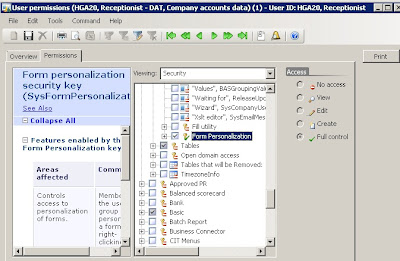
Usually when right clicking while running a form, there is a Setup button in the context menu. But sometimes if there isn't. In that case, for that specified user, a permission must be set.
You can set the permission by doing :
  1. Make sure that you are opening Administration tab.
  2. Click on Users and select the specified user (For this case I selected "receptionist").
  3. Click on the Permission button.
  4. Click on the Permission tab in the User Permission window.
  5. Make sure that you are viewing Security, and go to Administration -> Miscellanous and look for Form Personalization value. Make sure that it is checked and if it is not you can give it a value by changing the Access Mode.
User Permission window

Thursday, October 13, 2011

Creating and Using Number Sequences


public server static NumberSequenceReference numRefCustomNumber()
{
return NumberSeqReference::findReference(typeId2ExtendedTypeId(typeid(CustomId)));
}